
Many Samsung Smart TV users ask: Can I download IPTV Smarters on Samsung Smart TV?
The short answer is no, not directly. Samsung Smart TVs run on Tizen OS, and IPTV Smarters is not available on the Samsung App Store.
However, don’t worry — there are easy and reliable ways to use IPTV Smarters on your Samsung TV using external devices or screen mirroring. This guide explains all working methods step by step.
Best IPTV Solution for Samsung Smart TV (Recommended)
To get the best experience, we recommend using a trusted IPTV provider like
👉 Prime4K IPTV
✔ Supports M3U Playlist & Xtream Codes
✔ Works perfectly with IPTV Smarters, TiviMate, Firestick & Android TV
✔ Stable servers, HD & 4K quality
🎁 Free Trial: https://prime4k.tv/trial
📧 Email: support@prime4k.tv
📲 WhatsApp: +1 587 871 8847
Method 1: Use an Amazon Fire TV Stick (Recommended)
This is the simplest and most reliable solution.
Steps:
- Plug the Amazon Fire TV Stick into an HDMI port on your Samsung TV
- Connect it to your Wi-Fi
- Log in to your Amazon account
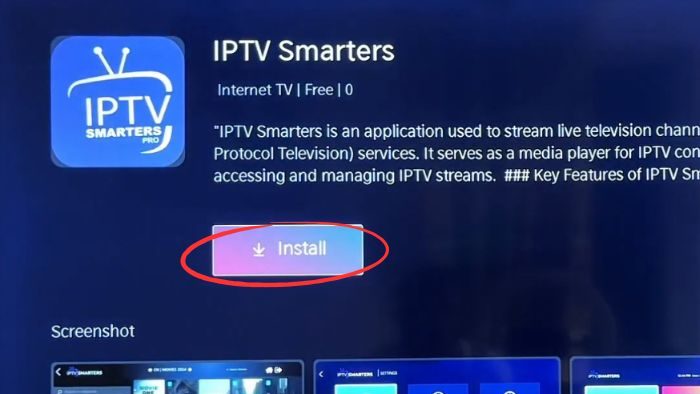
- Open Amazon Appstore
- Search for IPTV Smarters Pro
- Click Get / Install
🔗 Download IPTV Smarters Pro:
https://www.iptvsmarters.com/

Setup IPTV Smarters:
- Open the app
- Enter your Xtream Codes or M3U URL from
👉 Prime4K IPTV

You’ll get access to:
- Live TV channels
- Movies & Series (VOD)
- EPG (TV Guide)
- Multi-screen & time-shift features
Method 2: Use an Android TV Box or Chromecast
Option A: Android TV Box (Nvidia Shield, Xiaomi Mi Box, etc.)
- Connect the box to your Samsung TV via HDMI
- Connect to the internet
- Open Google Play Store
- Download IPTV Smarters Pro
- Log in using your Prime4K IPTV credentials
Option B: Chromecast
- Install IPTV Smarters on your Android or iPhone
- Connect phone & Chromecast to the same Wi-Fi
- Open the app
- Tap the Cast icon
- Select your Samsung TV
Method 3: Screen Mirroring from Smartphone
If you don’t want to buy extra devices:
Steps:
- Install IPTV Smarters Pro on your phone
- Connect phone & TV to the same Wi-Fi
- Enable screen mirroring:
- Android: Smart View / SmartThings
- iOS: AirPlay
- Launch IPTV Smarters on your phone
⚠️ Note: This method may cause slight lag compared to Firestick or Android TV.
Best IPTV Player Alternatives for Samsung TV
If you prefer other IPTV players:
- TiviMate IPTV Player (Firestick / Android TV)
https://play.google.com/store/apps/details?id=ar.tvplayer.tv - Smart IPTV (SIPTV)
https://siptv.app - Flix IPTV
https://flixiptv.eu
All players work perfectly with Prime4K IPTV playlists (M3U / Xtream Codes).
Quick Troubleshooting Tips
- Update your Samsung TV firmware
- Clear cache:
Settings > Support > Device Care > Storage Management - Check internet speed (minimum 10 Mbps)
- Change DNS to 8.8.8.8 or 1.1.1.1
- Reset Smart Hub if needed
- If problems persist, use Fire Stick or Android TV Box
Frequently Asked Questions (FAQ)
Is IPTV Smarters Free?
Yes, the app is free, but you need a paid IPTV subscription for content.
👉 Recommended provider: Prime4K IPTV
Will IPTV Smarters Void My Samsung TV Warranty?
No. Using IPTV players does not void hardware warranty, but Samsung won’t support third-party apps.
What Internet Speed Is Required?
- HD: 10 Mbps
- 4K: 25 Mbps
- Add 5–10 Mbps per extra device
Is IPTV Smarters Legal?
The app itself is legal. Always ensure your IPTV provider has proper content rights.
Can I Use Multiple IPTV Subscriptions?
Yes. IPTV Smarters supports multiple M3U & Xtream Codes logins.
More IPTV Setup Guides
📘 For more IPTV installation tutorials, click here:
👉 https://prime4k.tv/iptv-installation-tutorials/
Final Recommendation
If you want stable IPTV on Samsung Smart TV, the best solution is:
🔥 Firestick + IPTV Smarters + Prime4K IPTV
🎁 Try it free: https://prime4k.tv/trial
🌐 Website: https://prime4k.tv
📧 support@prime4k.tv
📲 +1 587 871 8847