
Installing IPTV Smarters Pro on Firestick is a simple and effective way to enjoy live TV, movies, series, and on-demand content directly on your TV. IPTV Smarters Pro is one of the most popular IPTV players and works perfectly with M3U playlists and Xtream Codes API.
In this guide, you’ll learn step by step how to install IPTV Smarters Pro on Firestick and how to connect it using a reliable IPTV service like PRIME4K.TV.
What Is IPTV Smarters Pro?
IPTV Smarters Pro is a powerful IPTV player available for Firestick, Android, iOS, Windows, and Smart TVs.
It does not host any content, but allows you to stream IPTV using credentials provided by your IPTV provider.
Key Features:
- Supports M3U URL & Xtream Codes API
- Live TV, Movies, Series & Catch-Up
- EPG (TV Guide) support
- Multi-screen & external player support
- User-friendly interface
👉 Recommended IPTV source: https://prime4k.tv
Step 1: Prepare Your Firestick for Installation
Before installing IPTV Smarters Pro, enable installation from unknown sources:
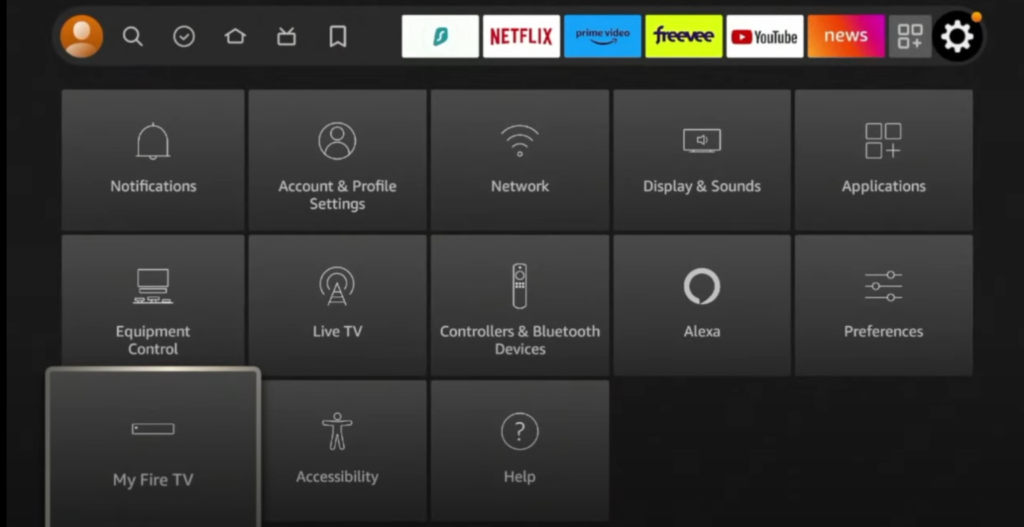
- Go to Settings on your Firestick
- Select My Fire TV
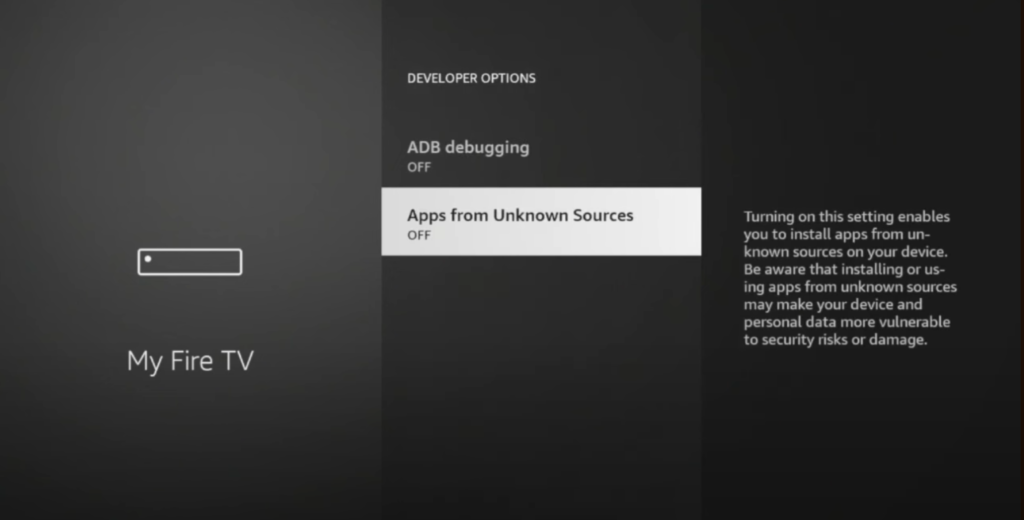
- Click Developer Options
- Enable:
- ✅ Apps from Unknown Sources
- ✅ ADB Debugging
This allows you to install apps outside the Amazon App Store.
Step 2: Install Downloader App (Required)
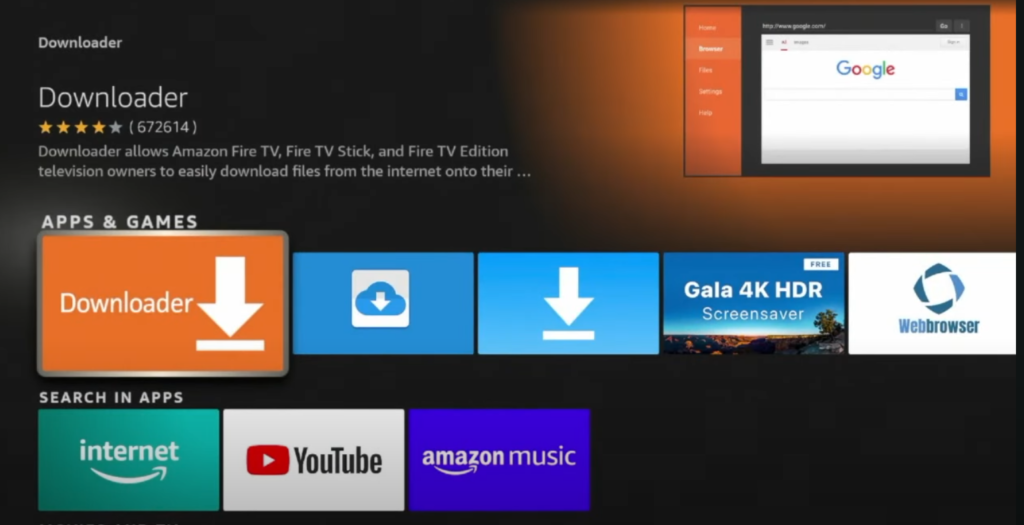
The Downloader app is needed to sideload IPTV Smarters Pro.
- From the Firestick Home screen, click Search
- Type Downloader
- Download and install Downloader from Amazon App Store
- Open Downloader and allow all permissions
🔗 Official Downloader info:
https://www.firesticktricks.com/downloader-app.html
Step 3: Download IPTV Smarters Pro APK
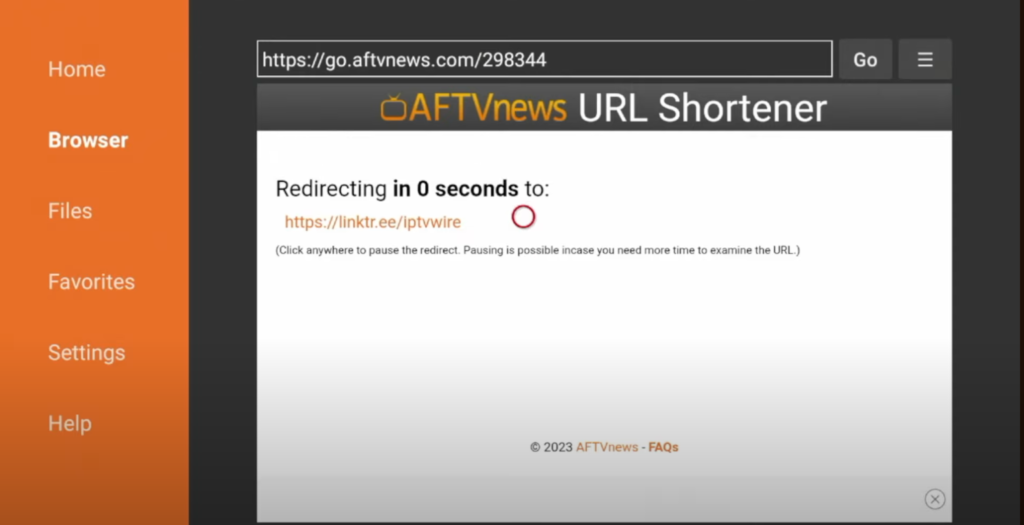
- Open the Downloader app
- Enter the official IPTV Smarters Pro download link:
🔗 https://www.iptvsmarters.com/smarters.apk
OR IPTV Smarters Pro – Downloader Code: 6468112
- Press Go
- Wait for the APK to download
- Click Install
- After installation, click Done

Step 4: Launch IPTV Smarters Pro on Firestick
- Go to Apps
- Open IPTV Smarters Pro
- Select your preferred layout
- Choose Login with Xtream Codes API or Load Your Playlist (M3U)

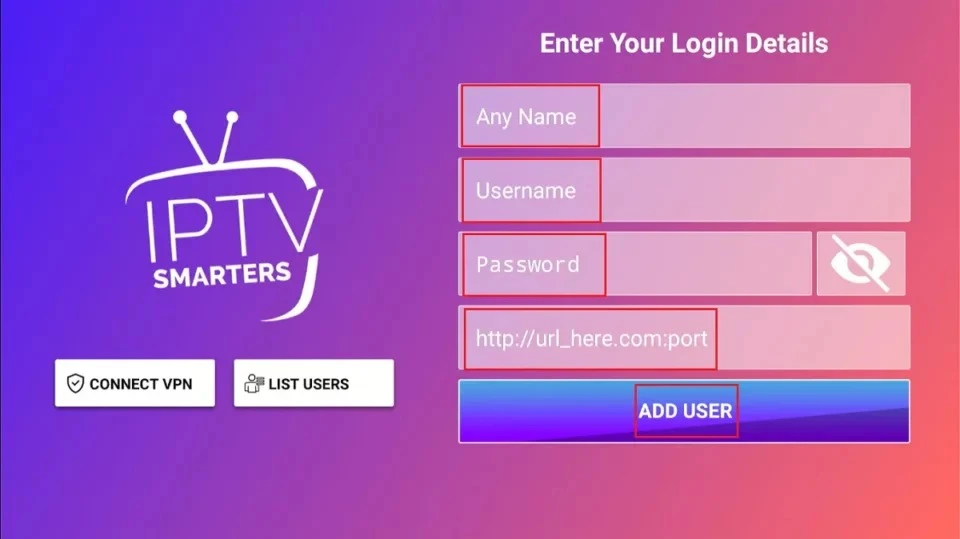
Step 5: Add IPTV Credentials (Recommended Method)
For the best experience, use Xtream Codes API.
Login Details Example:
- Server URL: Provided by your IPTV provider
- Username: Your IPTV username
- Password: Your IPTV password
✅ Recommended IPTV provider for stable streams:
👉 https://prime4k.tv
🎁 FREE 24H TRIAL:
👉 https://prime4k.tv/TRIAL/
Best IPTV Service for IPTV Smarters Pro
We recommend PRIME4K.TV as a reliable IPTV source because it offers:
- ✔️ Stable servers worldwide
- ✔️ HD / Full HD / 4K channels
- ✔️ Movies & Series (VOD)
- ✔️ Works with IPTV Smarters Pro
- ✔️ M3U & Xtream Codes support
🌐 Website: https://prime4k.tv
📧 Email: support@prime4k.tv
📱 WhatsApp: +1 587 871 8847
Common Problems & Fixes
IPTV Smarters Pro Not Working?
- Restart Firestick
- Check internet connection
- Update IPTV Smarters Pro
- Re-enter login credentials
- Clear app cache
Is IPTV Smarters Pro Safe?
Yes, IPTV Smarters Pro is safe when downloaded from official sources.
For privacy and security, using a VPN is always recommended.
IPTV Installation Tutorials (Internal Link)
For more setup guides on different devices, visit:
👉 IPTV Installation Tutorials:
https://prime4k.tv/iptv-installation-tutorials
Final Words
Installing IPTV Smarters Pro on Firestick takes only a few minutes and unlocks a full IPTV experience. When paired with a reliable service like PRIME4K.TV, you get smooth streaming, massive content, and excellent performance.
🎉 Try IPTV for FREE today:
👉 https://prime4k.tv/TRIAL/